Warning: Table './nattiq/watchdog' is marked as crashed and should be repaired
query: INSERT INTO watchdog
(uid, type, message, variables, severity, link, location, referer, hostname, timestamp)
VALUES
(0, 'php', '%message in %file on line %line.', 'a:4:{s:6:\"%error\";s:14:\"strict warning\";s:8:\"%message\";s:44:\"Only variables should be passed by reference\";s:5:\"%file\";s:50:\"/home/nattiq5/public_html/modules/book/book.module\";s:5:\"%line\";i:559;}', 3, '', 'http://www.nattiq.com/en/http%3A/%252Fwww.nattiq.com/en/node/Talks', '', '216.73.216.36', 1752393328) in /home/nattiq5/public_html/includes/database.mysqli.inc on line 134
Warning: Table './nattiq/watchdog' is marked as crashed and should be repaired
query: INSERT INTO watchdog
(uid, type, message, variables, severity, link, location, referer, hostname, timestamp)
VALUES
(0, 'php', '%message in %file on line %line.', 'a:4:{s:6:\"%error\";s:14:\"strict warning\";s:8:\"%message\";s:62:\"Non-static method view::load() should not be called statically\";s:5:\"%file\";s:62:\"/home/nattiq5/public_html/sites/all/modules/views/views.module\";s:5:\"%line\";i:906;}', 3, '', 'http://www.nattiq.com/en/http%3A/%252Fwww.nattiq.com/en/node/Talks', '', '216.73.216.36', 1752393328) in /home/nattiq5/public_html/includes/database.mysqli.inc on line 134
Warning: Table './nattiq/watchdog' is marked as crashed and should be repaired
query: INSERT INTO watchdog
(uid, type, message, variables, severity, link, location, referer, hostname, timestamp)
VALUES
(0, 'php', '%message in %file on line %line.', 'a:4:{s:6:\"%error\";s:14:\"strict warning\";s:8:\"%message\";s:120:\"Declaration of views_handler_field_comment::init() should be compatible with views_handler_field::init(&$view, $options)\";s:5:\"%file\";s:97:\"/home/nattiq5/public_html/sites/all/modules/views/modules/comment/views_handler_field_comment.inc\";s:5:\"%line\";i:0;}', 3, '', 'http://www.nattiq.com/en/http%3A/%252Fwww.nattiq.com/en/node/Talks', '', '216.73.216.36', 1752393328) in /home/nattiq5/public_html/includes/database.mysqli.inc on line 134
Warning: Table './nattiq/watchdog' is marked as crashed and should be repaired
query: INSERT INTO watchdog
(uid, type, message, variables, severity, link, location, referer, hostname, timestamp)
VALUES
(0, 'php', '%message in %file on line %line.', 'a:4:{s:6:\"%error\";s:14:\"strict warning\";s:8:\"%message\";s:134:\"Declaration of views_handler_filter::options_validate() should be compatible with views_handler::options_validate($form, &$form_state)\";s:5:\"%file\";s:83:\"/home/nattiq5/public_html/sites/all/modules/views/handlers/views_handler_filter.inc\";s:5:\"%line\";i:0;}', 3, '', 'http://www.nattiq.com/en/http%3A/%252Fwww.nattiq.com/en/node/Talks', '', '216.73.216.36', 1752393328) in /home/nattiq5/public_html/includes/database.mysqli.inc on line 134
Warning: Table './nattiq/watchdog' is marked as crashed and should be repaired
query: INSERT INTO watchdog
(uid, type, message, variables, severity, link, location, referer, hostname, timestamp)
VALUES
(0, 'php', '%message in %file on line %line.', 'a:4:{s:6:\"%error\";s:14:\"strict warning\";s:8:\"%message\";s:130:\"Declaration of views_handler_filter::options_submit() should be compatible with views_handler::options_submit($form, &$form_state)\";s:5:\"%file\";s:83:\"/home/nattiq5/public_html/sites/all/modules/views/handlers/views_handler_filter.inc\";s:5:\"%line\";i:0;}', 3, '', 'http://www.nattiq.com/en/http%3A/%252Fwww.nattiq.com/en/node/Talks', '', '216.73.216.36', 1752393328) in /home/nattiq5/public_html/includes/database.mysqli.inc on line 134
Warning: Table './nattiq/watchdog' is marked as crashed and should be repaired
query: INSERT INTO watchdog
(uid, type, message, variables, severity, link, location, referer, hostname, timestamp)
VALUES
(0, 'php', '%message in %file on line %line.', 'a:4:{s:6:\"%error\";s:14:\"strict warning\";s:8:\"%message\";s:148:\"Declaration of views_handler_filter_node_status::operator_form() should be compatible with views_handler_filter::operator_form(&$form, &$form_state)\";s:5:\"%file\";s:99:\"/home/nattiq5/public_html/sites/all/modules/views/modules/node/views_handler_filter_node_status.inc\";s:5:\"%line\";i:0;}', 3, '', 'http://www.nattiq.com/en/http%3A/%252Fwww.nattiq.com/en/node/Talks', '', '216.73.216.36', 1752393328) in /home/nattiq5/public_html/includes/database.mysqli.inc on line 134
Warning: Table './nattiq/watchdog' is marked as crashed and should be repaired
query: INSERT INTO watchdog
(uid, type, message, variables, severity, link, location, referer, hostname, timestamp)
VALUES
(0, 'php', '%message in %file on line %line.', 'a:4:{s:6:\"%error\";s:14:\"strict warning\";s:8:\"%message\";s:130:\"Declaration of views_plugin_row::options_validate() should be compatible with views_plugin::options_validate(&$form, &$form_state)\";s:5:\"%file\";s:78:\"/home/nattiq5/public_html/sites/all/modules/views/plugins/views_plugin_row.inc\";s:5:\"%line\";i:0;}', 3, '', 'http://www.nattiq.com/en/http%3A/%252Fwww.nattiq.com/en/node/Talks', '', '216.73.216.36', 1752393328) in /home/nattiq5/public_html/includes/database.mysqli.inc on line 134
Warning: Table './nattiq/watchdog' is marked as crashed and should be repaired
query: INSERT INTO watchdog
(uid, type, message, variables, severity, link, location, referer, hostname, timestamp)
VALUES
(0, 'php', '%message in %file on line %line.', 'a:4:{s:6:\"%error\";s:14:\"strict warning\";s:8:\"%message\";s:126:\"Declaration of views_plugin_row::options_submit() should be compatible with views_plugin::options_submit(&$form, &$form_state)\";s:5:\"%file\";s:78:\"/home/nattiq5/public_html/sites/all/modules/views/plugins/views_plugin_row.inc\";s:5:\"%line\";i:0;}', 3, '', 'http://www.nattiq.com/en/http%3A/%252Fwww.nattiq.com/en/node/Talks', '', '216.73.216.36', 1752393328) in /home/nattiq5/public_html/includes/database.mysqli.inc on line 134
Warning: Table './nattiq/watchdog' is marked as crashed and should be repaired
query: INSERT INTO watchdog
(uid, type, message, variables, severity, link, location, referer, hostname, timestamp)
VALUES
(0, 'php', '%message in %file on line %line.', 'a:4:{s:6:\"%error\";s:7:\"warning\";s:8:\"%message\";s:137:\"Cannot modify header information - headers already sent by (output started at /home/nattiq5/public_html/includes/database.mysqli.inc:134)\";s:5:\"%file\";s:70:\"/home/nattiq5/public_html/sites/all/modules/pagestyle/pagestyle.module\";s:5:\"%line\";i:86;}', 3, '', 'http://www.nattiq.com/en/http%3A/%252Fwww.nattiq.com/en/node/Talks', '', '216.73.216.36', 1752393328) in /home/nattiq5/public_html/includes/database.mysqli.inc on line 134
Warning: Table './nattiq/watchdog' is marked as crashed and should be repaired
query: INSERT INTO watchdog
(uid, type, message, variables, severity, link, location, referer, hostname, timestamp)
VALUES
(0, 'php', '%message in %file on line %line.', 'a:4:{s:6:\"%error\";s:7:\"warning\";s:8:\"%message\";s:137:\"Cannot modify header information - headers already sent by (output started at /home/nattiq5/public_html/includes/database.mysqli.inc:134)\";s:5:\"%file\";s:70:\"/home/nattiq5/public_html/sites/all/modules/pagestyle/pagestyle.module\";s:5:\"%line\";i:86;}', 3, '', 'http://www.nattiq.com/en/http%3A/%252Fwww.nattiq.com/en/node/Talks', '', '216.73.216.36', 1752393328) in /home/nattiq5/public_html/includes/database.mysqli.inc on line 134
Warning: Table './nattiq/watchdog' is marked as crashed and should be repaired
query: INSERT INTO watchdog
(uid, type, message, variables, severity, link, location, referer, hostname, timestamp)
VALUES
(0, 'php', '%message in %file on line %line.', 'a:4:{s:6:\"%error\";s:7:\"warning\";s:8:\"%message\";s:137:\"Cannot modify header information - headers already sent by (output started at /home/nattiq5/public_html/includes/database.mysqli.inc:134)\";s:5:\"%file\";s:70:\"/home/nattiq5/public_html/sites/all/modules/pagestyle/pagestyle.module\";s:5:\"%line\";i:86;}', 3, '', 'http://www.nattiq.com/en/http%3A/%252Fwww.nattiq.com/en/node/Talks', '', '216.73.216.36', 1752393328) in /home/nattiq5/public_html/includes/database.mysqli.inc on line 134
Warning: Table './nattiq/watchdog' is marked as crashed and should be repaired
query: INSERT INTO watchdog
(uid, type, message, variables, severity, link, location, referer, hostname, timestamp)
VALUES
(0, 'php', '%message in %file on line %line.', 'a:4:{s:6:\"%error\";s:7:\"warning\";s:8:\"%message\";s:137:\"Cannot modify header information - headers already sent by (output started at /home/nattiq5/public_html/includes/database.mysqli.inc:134)\";s:5:\"%file\";s:68:\"/home/nattiq5/public_html/sites/all/modules/textsize/textsize.module\";s:5:\"%line\";i:80;}', 3, '', 'http://www.nattiq.com/en/http%3A/%252Fwww.nattiq.com/en/node/Talks', '', '216.73.216.36', 1752393328) in /home/nattiq5/public_html/includes/database.mysqli.inc on line 134
Warning: Table './nattiq/watchdog' is marked as crashed and should be repaired
query: INSERT INTO watchdog
(uid, type, message, variables, severity, link, location, referer, hostname, timestamp)
VALUES
(0, 'php', '%message in %file on line %line.', 'a:4:{s:6:\"%error\";s:7:\"warning\";s:8:\"%message\";s:137:\"Cannot modify header information - headers already sent by (output started at /home/nattiq5/public_html/includes/database.mysqli.inc:134)\";s:5:\"%file\";s:68:\"/home/nattiq5/public_html/sites/all/modules/textsize/textsize.module\";s:5:\"%line\";i:80;}', 3, '', 'http://www.nattiq.com/en/http%3A/%252Fwww.nattiq.com/en/node/Talks', '', '216.73.216.36', 1752393328) in /home/nattiq5/public_html/includes/database.mysqli.inc on line 134
Warning: Table './nattiq/watchdog' is marked as crashed and should be repaired
query: INSERT INTO watchdog
(uid, type, message, variables, severity, link, location, referer, hostname, timestamp)
VALUES
(0, 'php', '%message in %file on line %line.', 'a:4:{s:6:\"%error\";s:7:\"warning\";s:8:\"%message\";s:137:\"Cannot modify header information - headers already sent by (output started at /home/nattiq5/public_html/includes/database.mysqli.inc:134)\";s:5:\"%file\";s:68:\"/home/nattiq5/public_html/sites/all/modules/textsize/textsize.module\";s:5:\"%line\";i:80;}', 3, '', 'http://www.nattiq.com/en/http%3A/%252Fwww.nattiq.com/en/node/Talks', '', '216.73.216.36', 1752393328) in /home/nattiq5/public_html/includes/database.mysqli.inc on line 134
Warning: Table './nattiq/watchdog' is marked as crashed and should be repaired
query: INSERT INTO watchdog
(uid, type, message, variables, severity, link, location, referer, hostname, timestamp)
VALUES
(0, 'php', '%message in %file on line %line.', 'a:4:{s:6:\"%error\";s:14:\"strict warning\";s:8:\"%message\";s:44:\"Only variables should be passed by reference\";s:5:\"%file\";s:63:\"/home/nattiq5/public_html/sites/all/modules/captcha/captcha.inc\";s:5:\"%line\";i:61;}', 3, '', 'http://www.nattiq.com/en/http%3A/%252Fwww.nattiq.com/en/node/Talks', '', '216.73.216.36', 1752393328) in /home/nattiq5/public_html/includes/database.mysqli.inc on line 134 What is Talks and Zooms? | Nattiq Technologies
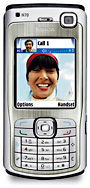
Nuance TALKS™ converts the display text of a cellular handset into highly intelligible speech, making the device completely accessible for blind and visually impaired people. Nuance TALKS runs on Symbian-powered mobile phones to speech-enable contact names, callerID, text messages, help files and other screen content. Zooms magnifies the cellular handset in from 1 up to
Overview
Running on Symbian™ Series 60 phones, Nuance TALKS converts the displayed text on the mobile handset into highly intelligible speech. With Nuance TALKS, blind and low-vision users can take advantage of most features, including contact directories, caller ID, text messages, help files, access to the Nokia web browser, and other screen content, available on their mobile phones. Plus, Nuance TALKS Premium Edition provides a user dictionary the ability to label icons with a corresponding text equivalent, as well as the new Object Viewer, to improve access to built-in as well as 3rd-party applications.
Nuance TALKS' eyes-free access can also deliver greater convenience and mobility to sighted cellular handset users. For example, it enables drivers to access text messages, listen to emails, manage contact information from their mobile phones and optionally automates the read-out of the caller ID and text messages-without taking their eyes off the road.
Unleash the exciting new features and the variety of form factors of these new smartphones from Nokia™!
WMA and MP3 playback, with support for Digital Rights Management
Basic GPS access
Internet telephony (voice over IP / SIP)
Triband/quadband GSM, WCDMA (UMTS), Wireless LAN connectivity
Etc.
Choose the handset with the features you prefer, and let TALKS be your key to accessibility!
Target Customers
* Blind persons and those with severe visual impairments
* Low-vision and seniors (combined with Nuance ZOOMS™)
* Users with needs for eyes-free operation of handset
New Features for Nuance TALKS Standard and Premium Edition
* Automatic caller ID announcement
o The caller ID for incoming calls can be announced after a specified number of seconds.
o If caller ID announcement is on, the caller ID can be repeated with a specified interval, until a call is taken or rejected.
* Automatic SMS read-out
o Read-out of incoming text messages can be turned on or off.
o When text message read-out is on:
+ Incoming text messages are automatically opened and read-out.
+ After the read-out, a dialogue asks whether the read-out should be repeated.
* Application-Specific Settings
o User can Define a set of options to be different for any specific application.
o Default are global settings.
Key Features
* Unprecedented Feature/Function Accessibility
o Audio feedback when writing or reading text messages, emails, and notes
o Automatic or manual Caller ID announcement
o Network, battery, and other status indicators read out
* Spelling speed setting
Allows the user to define different speech rates for normal read-out and spelling text.
* Various options for reading numbers
Numbers longer than four digits can now be read as single digits, double digits, or whole numbers.
* Echo mode
An independent setting allows the user to turn on a special key echo mode for those who like to use the T9 dictionary when entering text.
* Echo Passwords mode
Allows the user to hear the letters entered into a password field.
* TALKS Key Timeout and TALKS Mode Timeout
Allows the user to set a timeout for cases where the TALKS key is pressed accidentally, and allow to repeat a command or even execute different commands without Pressing the TALKS key again.
* Hear caller ID information
Adds speech output to the original user interface of the cell phone.
* Software only
No additional hardware is needed.
* Voice Familiarity for Increased User Comfort
Nuance TALKS leverages ETI-Eloquence TTS software— used in popular desktop screen readers—making many users feel instantly familiar with the voice they hear for speech output.
* Control over volume and speaking rate
* Supports many third-party applications
Supports IM+ (Instant Messenger) [S60], the Wayfinder GPS application [S60], and the Slovoed dictionary [S60 and S80].
Supported Languages:
Arabic, English, French, and many other supported languages.
Warning: Table './nattiq/watchdog' is marked as crashed and should be repaired
query: INSERT INTO watchdog
(uid, type, message, variables, severity, link, location, referer, hostname, timestamp)
VALUES
(0, 'php', '%message in %file on line %line.', 'a:4:{s:6:\"%error\";s:12:\"user warning\";s:8:\"%message\";s:334:\"Table './nattiq/accesslog' is marked as crashed and should be repaired\nquery: INSERT INTO accesslog (title, path, url, hostname, uid, sid, timer, timestamp) values('What is Talks and Zooms?', 'node/502', '', '216.73.216.36', 0, 'hivkb70iaua14ofd2pir8samt6', 373, 1752393328)\";s:5:\"%file\";s:62:\"/home/nattiq5/public_html/modules/statistics/statistics.module\";s:5:\"%line\";i:63;}', 3, '', 'http://www.nattiq.com/en/http%3A/%252Fwww.nattiq.com/en/node/Talks', &# in /home/nattiq5/public_html/includes/database.mysqli.inc on line 134